

A fast, modern website can still miss search traffic if Google can't find the content behind the interface. Single page application SEO helps search engines discover, understand, and index each important page in an app that loads much of its content with JavaScript.
The goal isn't to abandon a single-page application. The goal is to give every service, location, product, or resource a real URL, useful HTML, clear metadata, and a reliable path for crawlers. Here's how small businesses can do that without creating unnecessary technical costs.
Why single-page application SEO needs a different plan
A traditional website usually sends a separate HTML file for each page. A single-page application, or SPA, often sends one basic HTML shell first. JavaScript then loads the content and changes what you see when you move between sections.
That setup can create a smooth experience for visitors. It can also create search problems when important content doesn't appear until scripts run.
The first load is not the whole website
Search engines need more than a visual interface. They need to discover URLs, request pages, read content, understand page relationships, and process signals such as titles and canonical tags.
Google can render JavaScript, but rendering isn't a reason to ignore the initial response. Search engines may encounter delays, blocked resources, broken scripts, or routes that aren't linked anywhere. A page that looks complete in your browser may still send weak signals to a crawler.
For a local service company, each important page should stand on its own. A page for water heater repair should have its own URL, content, title, and conversion path. It shouldn't exist only as a view inside a general services screen.
Small businesses have less room for technical waste
Large websites can spend more time debugging rendering systems and monitoring thousands of routes. Small businesses usually need a simpler setup that supports calls, bookings, quote requests, and local visibility.
We recommend starting with the pages that can produce business results. That usually includes core services, important service areas, contact information, and helpful answers to common customer questions.
Build crawlable URLs before polishing the interface
URL structure is one of the most important parts of single-page application SEO. Every meaningful view needs a stable address that people can visit, share, bookmark, and search engines can crawl.
Use real routes instead of hash fragments
A route such as:
https://example.com/services/roof-repair
is easier to manage than:
https://example.com/#roof-repair
Use the History API for client-side routing. This lets the application change views without a full page reload while keeping normal-looking URLs. Google's JavaScript SEO basics also recommends the History API for single-page applications.
Each route should return the correct content when someone visits it directly. Test this by opening the URL in a new private browser window. If the page only works after visiting the homepage first, the route needs attention.
Link routes with normal anchor elements
JavaScript click handlers alone don't create a dependable discovery system. Important pages should be connected with standard HTML links that use an href attribute.
A service navigation menu can link to /services/plumbing. A location page can link to related services. A blog post can link to the service page that answers the reader's question.
Avoid hiding important routes behind filters, search boxes, or application state. If a page matters for search, give crawlers a clear path to find it.
Choose a rendering approach that fits the budget
Rendering controls when a page's meaningful HTML becomes available. There isn't one perfect method for every small business, and no rendering approach guarantees rankings by itself.
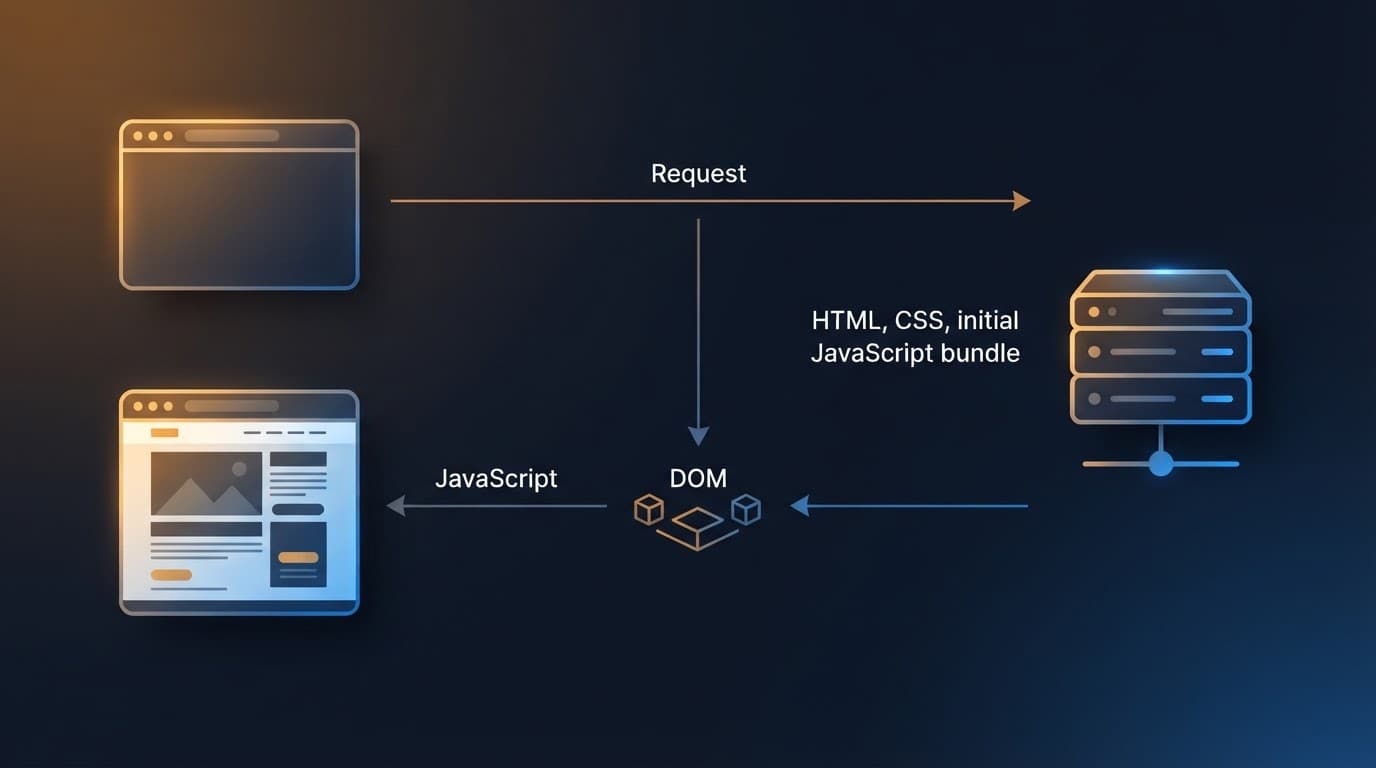
Client-side rendering keeps the server simple
With client-side rendering, the browser receives a basic document and JavaScript builds the page. React, Vue, and Angular applications can use this approach.
CSR can work for pages that don't need organic search traffic, such as customer dashboards or private booking tools. It is less comfortable for public service pages because search engines must process the JavaScript before seeing the main content.
If you already have a client-rendered website, don't assume a complete rebuild is the first answer. Check whether the rendered DOM contains the main text, whether routes load directly, and whether metadata changes correctly. Fixing those issues may cost less than changing platforms.
Server-side rendering sends useful HTML sooner
Server-side rendering creates the page HTML on the server for each request. The browser can display meaningful content before the application finishes loading.
SSR is often a good fit for public pages that change regularly. It can support stronger initial content and metadata, but it adds hosting, caching, and development requirements. A small company should confirm that the team can maintain the setup before choosing it.
Static generation works well for stable pages
Static generation creates HTML files during a build. Service pages, location pages, guides, and frequently visited landing pages often fit this model because they don't change every minute.
Hybrid rendering combines methods. For example, a business could statically generate service pages, use server-side rendering for frequently changing inventory, and keep account pages client-rendered.
A framework comparison from this SPA SEO rendering guide can help developers compare these approaches. The right choice depends on page updates, hosting, developer skills, and budget, not on the framework name alone.
Give every route its own SEO signals
A common SPA problem is one title, one description, and one canonical URL for every view. Search engines then receive weak or duplicated information.
Update titles and canonicals reliably
Each indexable route should have a descriptive title and meta description that match the page content. A page about furnace installation should not use the same title as the homepage.
Canonical URLs also need consistency. The canonical value in the initial HTML should match the route being served. Changing it only after JavaScript runs can create mixed signals, especially when the server sends the homepage shell for every URL.
Use one preferred version of each URL. Decide whether the site uses trailing slashes, lowercase paths, and a www or non-www domain. Then apply that choice everywhere.
Keep important content in the rendered DOM
The page's primary text should exist as HTML content after rendering. Don't place essential service details only inside images, canvas elements, or interactions that require several clicks.
Google's guidance also covers descriptive titles, proper HTTP status codes, canonicalization, JSON-LD, and making web component content available in rendered HTML. These details matter because search engines need information they can process, not only a page that looks correct on screen.
Help search engines discover local service pages
Good routes still need supporting signals. A small business website should make its important pages easy to find and easy to interpret.
Submit a sitemap with real URLs
Create an XML sitemap that lists the canonical URLs you want indexed. Include service pages, location pages, important articles, and other useful public content.
Don't include test routes, filtered duplicates, login screens, or pages marked noindex. A sitemap isn't a command to index every listed URL. It is a clean list of the pages you want search engines to consider.
Submit the sitemap in Google Search Console. Then check whether the listed URLs are accessible, canonicalized correctly, and linked from the site.
Use structured data for the right page type
JSON-LD can help search engines understand details such as a local business, organization, service, article, or breadcrumb trail. The markup must match visible page content.
For local businesses, keep the business name, address, phone number, hours, and service information accurate across the website. Structured data can't repair inconsistent business details or thin landing pages.
A page about a local service should still explain the service in plain language. Include the problems solved, the areas served, what customers can expect, and a clear next step.
Protect speed on mobile devices
JavaScript can improve interactions, but large bundles can delay the first useful view. Mobile visitors may have slower connections, older devices, or limited data plans.
Track the three Core Web Vitals
Google's current Core Web Vitals are:
- Largest Contentful Paint, or LCP, with a target of 2.5 seconds or less.
- Interaction to Next Paint, or INP, with a target below 200 milliseconds.
- Cumulative Layout Shift, or CLS, with a target below 0.1.
These measurements look at loading, responsiveness, and visual stability. Search Console groups real-world URL data into Good, Need improvement, and Poor categories. Only indexed URLs can appear in the Core Web Vitals report, so indexing problems should be fixed first.
Reduce the work required on the first visit
Start with the largest causes of delay. Split JavaScript bundles so every route doesn't load every feature. Compress images, reserve space for media, remove unused scripts, and delay nonessential widgets.
A chat tool, tracking script, review feed, or animation may help conversions, but each adds work. Keep the page focused on the action you want visitors to take.
Avoid common SPA SEO mistakes
Small problems can affect several routes at once. A careful test plan catches them before a launch or redesign.
Don’t create duplicate homepages
If /, /home, and /index all load the same content, choose one canonical version. Redirect or canonicalize the others according to your site structure.
The same issue can appear with query parameters, filter states, and route variations. A page that changes only a small piece of content may not need its own indexable URL.
Return real errors for missing pages
A missing route shouldn't display the homepage with a friendly message and a successful 200 status. That creates a soft 404. Search engines may treat the URL as a valid page even though it has no useful content.
Configure the application or server to return a real 404 status for missing content. Google also lists JavaScript redirects to a URL with a real 404 response and JavaScript-applied noindex as possible fixes.
Google describes dynamic rendering as a workaround when JavaScript-generated content isn't available to search engines. It may help in limited cases, but a server-rendered, statically generated, or hybrid setup is usually easier to maintain when the site depends heavily on organic search.
Prioritize the work with a practical checklist
A small business doesn't need to fix every technical detail on the same day. Start with the items that affect discovery and customer-facing pages.
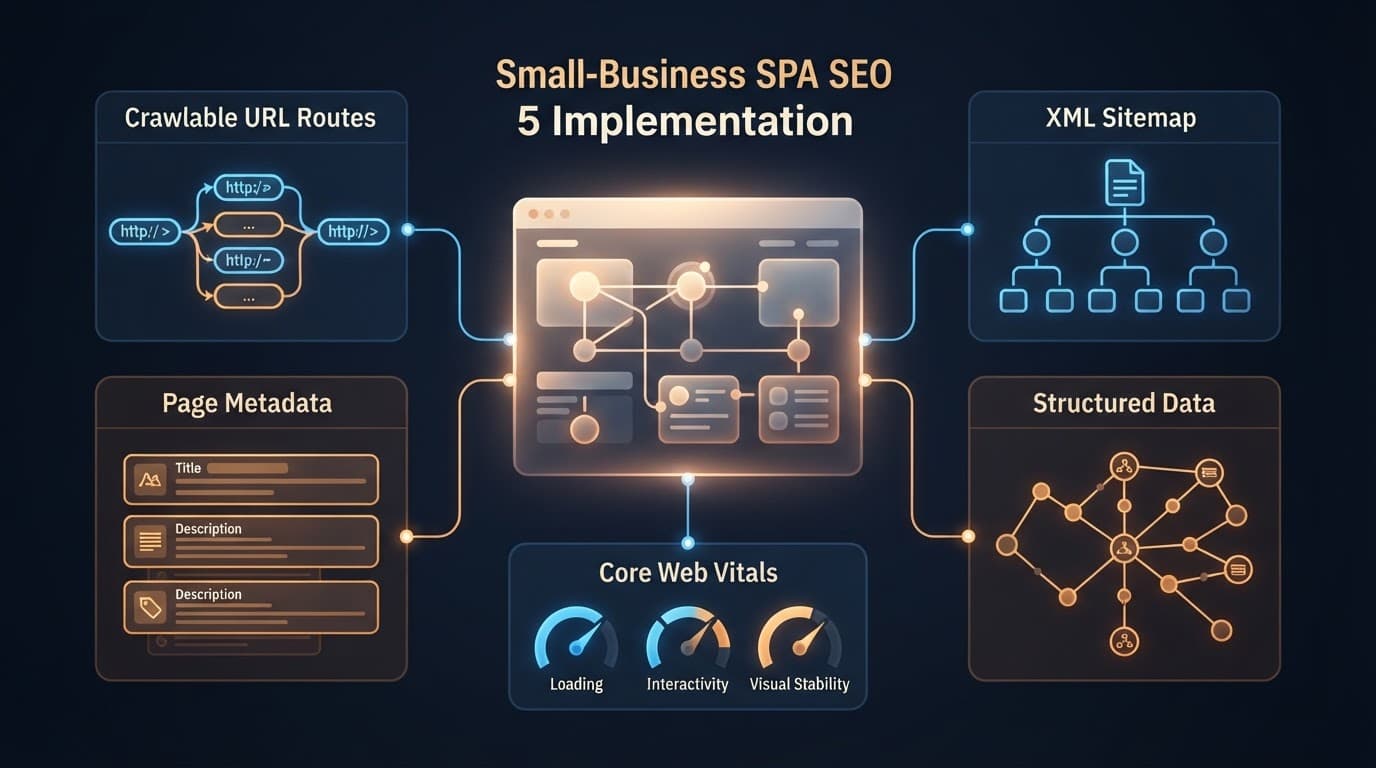
- List every important route. Include services, service areas, products, articles, contact pages, and other public pages that support business goals.
- Test direct access. Open each route in a new browser session. Confirm that the correct content loads without visiting the homepage first.
- Check the rendered HTML. Use browser inspection and Google Search Console's URL Inspection tool. Confirm that the main text, links, title, canonical, and structured data are available after rendering.
- Fix crawl paths. Replace script-only navigation with normal links. Connect related services and locations so important pages aren't isolated.
- Clean up technical signals. Create the XML sitemap, check robots rules, handle missing routes with real 404 responses, and remove duplicate or low-value URLs.
- Measure performance and indexing. Review Search Console coverage and Core Web Vitals. Test mobile loading, JavaScript errors, layout shifts, and delayed interactions.
The priority is simple: make important pages discoverable, renderable, understandable, and useful. Once those basics work, design improvements and advanced features have a stronger foundation.
Conclusion
Single-page applications can support strong search visibility when every valuable view has a real URL and useful content reaches the rendered page. The main decisions involve routing, rendering, metadata, internal links, sitemaps, structured data, and mobile performance.
We recommend starting with your revenue-producing pages instead of rebuilding the entire website. Fix direct route access, crawlable links, page-level signals, and soft 404s first. Reliable rendering and clear URLs give small businesses a practical path to better visibility without adding technical work they don't need.







