
A site can look fine in a browser and still throw a wall of 429 errors at Googlebot. When that happens, crawl speed drops, indexing slows, and new content can take longer to show up.
This is one of those problems that feels small at first. Then we check logs and see the pattern repeating across pages, bots, or whole sections of the site. The good news is that most 429 problems are fixable once we find the layer causing them.
What an HTTP 429 means for Googlebot
A 429 response means “too many requests.” The server, CDN, or WAF is telling the visitor to slow down because it thinks the request rate is too high.
That is useful when traffic spikes are real. It is not useful when the limit catches search bots, important users, or our own tools.

For SEO, the problem is not the number itself. The problem is what Googlebot does next. If it keeps hitting rate limits, it backs off and crawls less often.
That matters more on large sites. A store, publisher, or service site with frequent updates depends on steady crawling. If Googlebot slows down, fresh pages may wait longer to be discovered. That is where crawl budget explained starts to matter in a very practical way.
A 429 can be temporary and harmless. It becomes a real SEO issue when it repeats across many URLs or lasts for days.
A short burst of 429s can be a useful traffic control signal. A long run of 429s is a crawl problem.
Why repeated 429s hurt crawlability and rankings
Google has been clear about this. Short-term rate limiting can be acceptable when a server is overloaded, but long-term 429s can slow or stop crawling. For a temporary reduction, Google’s own crawl-rate guidance says the response should be short-lived, not a standing policy.
When Googlebot keeps getting blocked, a few things happen:
- New pages take longer to get discovered.
- Updated pages stay stale longer in search results.
- Crawl capacity gets spent on retries instead of useful URLs.
- In serious cases, pages can disappear from the index for a while.
This is not a mystery problem. It is a signal problem. Search engines want to know the site is available. If we keep telling them to slow down, they usually do.
The impact is even clearer on sites that already have crawl waste. If Googlebot spends time on redirects, duplicate URLs, or error pages, the hit from 429s is bigger. That is why 429 problems often show up alongside other crawl inefficiencies, not alone.
Where the rate limit is coming from
The first job is finding the source. A 429 can come from the web server, the CDN, a WAF, a security plugin, or even an application layer rule inside the CMS.

Here is what we usually check first:
- Server logs
Look for request spikes, repeated user agents, or one IP hammering the same paths. - CDN and WAF rules
Cloudflare, Sucuri, and similar layers often apply rate limits before the request reaches the origin. - WordPress plugins or app rules
Security plugins, backup jobs, image optimizers, and search plugins can create bursts of requests. - Your own SEO crawl tools
Screaming Frog, Sitebulb, Ahrefs, and similar tools can trip limits if they run too fast. - Background jobs and batch tasks
Imports, exports, cache clears, and media processing can overload the server without looking like traffic.
The useful question is simple. Are we protecting the site from abuse, or are we blocking normal crawl activity by accident? If it is the second case, we need to tune the controls, not ignore them.
This is also where CDN and site performance matter. A good CDN can absorb load and reduce strain on the origin. A bad setup can block the very crawlers we want to reach the site.
How to fix HTTP 429 errors without hurting search visibility
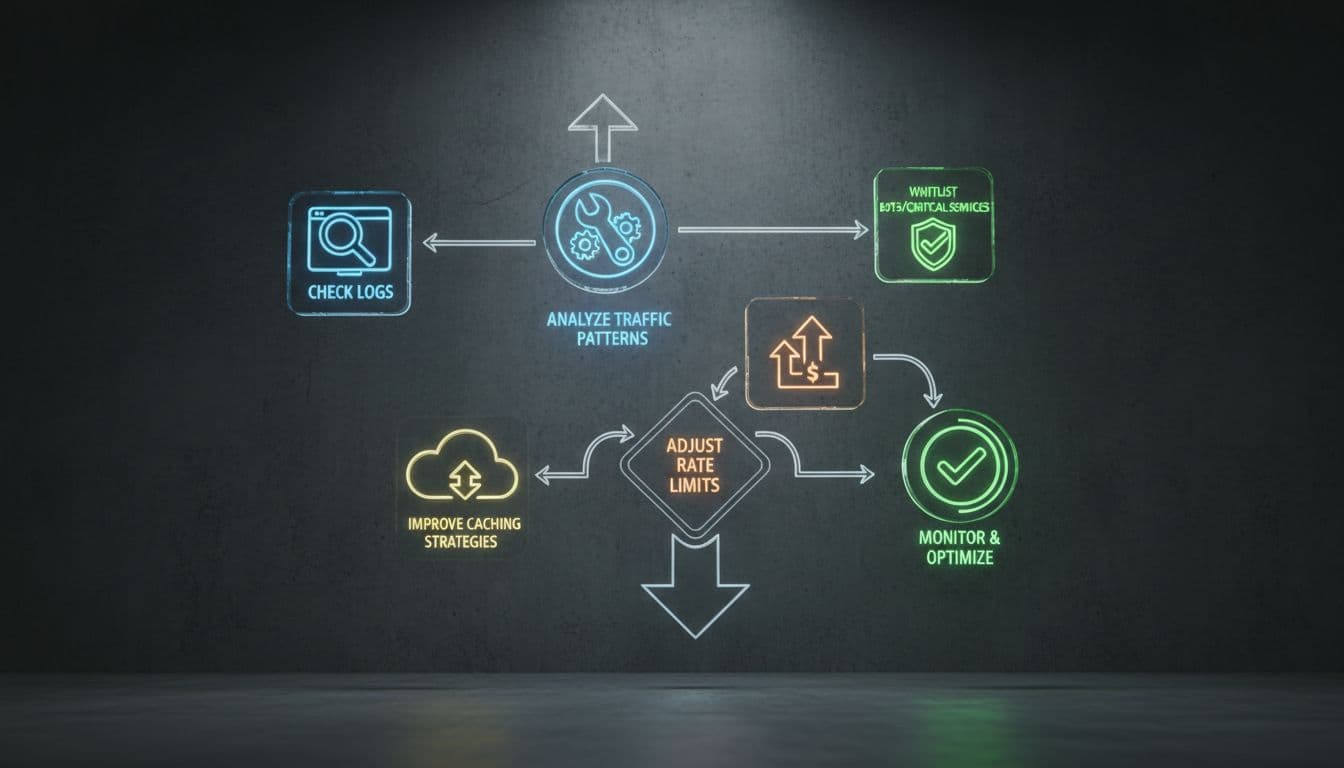
We want a fix that protects the site and keeps crawlers moving. The goal is not to remove every limit. The goal is to set the limits in the right place.
1. Find the layer that returns the 429
Start with the response headers and logs. If the 429 comes from the CDN, the origin server may be healthy. If it comes from the origin, the CDN is not the cause.
This matters because the fix changes with the layer. We do not tune a WordPress plugin when the WAF is blocking requests. We do not relax the WAF when the database is the real bottleneck.
2. Use Retry-After correctly
If we are returning 429s on purpose, the response should tell bots when to try again. That is what Retry-After is for.
A short retry window helps polite crawlers behave. It also helps us avoid repeated retry loops. For a temporary overload, this is much better than serving a vague block without guidance.
3. Adjust rate limits for verified bots
Search bots should not be treated like abusive traffic. If we know the bot is real, we can allow it more room.
That does not mean opening the door to every user agent string that says “Googlebot.” We should verify bot requests before allowlisting them. Spoofed user agents are common, so IP and reverse DNS checks matter.
If a WAF or CDN is the source of the issue, we can usually create a separate rule for verified search bots. The rule should be narrow, not broad. We want to reduce false positives, not weaken security across the site.
4. Improve caching and reduce server load
If the site is under strain, the best fix is often less work per request. Better caching, smaller queries, and fewer heavy background tasks can solve the root problem.
Static caching helps pages serve faster. Object caching helps database-heavy sites. Image compression and asset optimization also matter, because every slow request increases the chance of a limit firing.
If the site is on shared hosting and load spikes keep causing 429s, we may need more capacity. Sometimes that means a better plan. Sometimes it means moving to better infrastructure. Either way, the server has to keep up with demand.
5. Slow down your own crawls and batch jobs
If our team is running SEO crawls, we should lower the crawl speed. There is no prize for maxing out the request rate.
The same goes for plugin jobs, imports, and automated scans. Run them in smaller batches. Stagger them outside peak traffic hours. That gives the site room to breathe.
6. Check robots.txt, but do not use it as a throttle
robots.txt is useful for crawl control, but it does not fix rate limits by itself. If the server is already returning 429s, robots rules will not save the crawl.
This is a good time to review robots.txt SEO best practices. We want crawl rules that support indexing, not rules that hide a separate performance problem.
Temporary slowdown or real crawl blockage?
The difference matters. A few 429s during a traffic spike is one thing. Days of 429s across important pages is another.
| Pattern | What it usually means | What we should do |
|---|---|---|
| A short burst during peak traffic | The limit is working as intended | Watch logs, then retest after load drops |
| 429s only on one tool or IP range | A crawler or script is too aggressive | Slow the tool down or tighten that job |
| 429s across many pages for hours | The site is overloaded or misconfigured | Check server, CDN, WAF, and cache layers |
| 429s for Googlebot over multiple days | Crawling is being blocked in a serious way | Fix the limit fast and monitor crawl stats |
Google’s crawling error guide points site owners to Crawl Stats in Search Console for this exact reason. We want to see when the errors started, which URLs were hit, and whether the pattern is shrinking or spreading.
Google also notes that returning 429 or 503 can be fine for a short period, but not for a few days straight. If the site keeps serving those responses, crawling can slow down hard, and some URLs can even fall out of the index.
For rate limiting on search bots, Google’s advice on handling bot traffic is simple, use 429 for legitimate throttling, not 403 or 404. Those other codes send the wrong signal and can create bigger indexing problems.
What to watch after the fix
Once we adjust the limits, we should not assume the problem is gone. We should verify it.
Look at three things first. Server logs should show fewer 429s. Search Console Crawl Stats should start to normalize. And important URLs should begin getting crawled again on a steady schedule.
If the numbers improve for a day and then spike again, we are still missing the root cause. Maybe one plugin keeps firing. Maybe the CDN rule is too strict. Maybe the site still needs more capacity.
That is where technical SEO checklist thinking helps. Rate limits are one item in a larger site-health picture, and they work best when we review the whole system, not just one error code.
Conclusion
HTTP 429 errors are often a protection feature, but they turn into an SEO problem when they hit search bots or repeat for too long. The fix is usually not one magic setting. It is a clean mix of better logs, smarter limits, stronger caching, and verified bot handling.
A simple checklist keeps us honest:
- Check where the 429 response is coming from.
- Confirm whether
Retry-Afteris set correctly. - Tune CDN, WAF, and server limits instead of guessing.
- Allowlist verified bots only when it makes sense.
- Review Crawl Stats, server logs, and robots rules after the change.
If we handle it that way, a 429 stays a temporary brake, not a long-term crawl block.